Frequently asked questions
What do you want to know?
Explore Upkip in detail: implementation, productivity, functionalities and more
About Upkip
What is Upkip?
Upkip is a real-time manufacturing monitoring solution with advanced analytics capabilities and machine learning enabled features.
It is a quick and easy fit for the SME segment, however suitable for enterprises as well.
It is an Industry 4.0 digital transformation platform in the cloud. Build on top of Microsoft Azure, relying on over 70 services, its security, flexibility and robustness are guaranteed by Microsoft investments.
Upkip connects with CNC machine controllers and various sensors (external) to extract, store and analyze data and turn it into actionable real-time insights for employees from shop to top levels (machine operators, shift leaders, quality supervisors and managers) within a factory. It connects with existing systems (ERP, Maintenance, SCADA etc.) to centralize the data needed for optimization and further digitalization of the company.
Upkip makes sense of Industry 4.0 data, putting in the right context for informed decision making.
How does Upkip monitor conditions in my facility wirelessly?
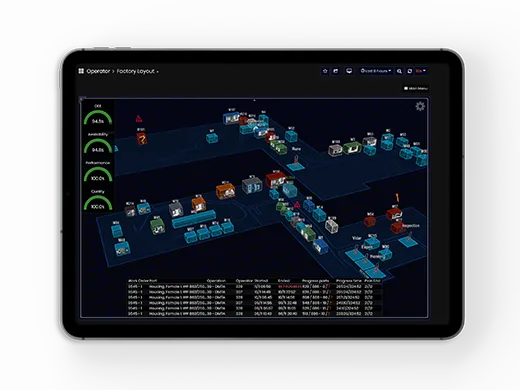
By deploying Upkip on your facility, you will have access to all of its processes, connected equipment and monitored environments through any device’s internet browser. Allied with your choice of sensors and systems, it aggregates huge amounts of data from a myriad of possible integrations, for analytics that inform your decisions. With intuitive dashboards, you can navigate to find the information you need. This is helped by the digital twin function, which creates an easy-to-navigate virtual copy of your shop floor that quickly guides you to what needs your attention, with alarms, warnings, key KPIs – OEE, availability, performance and quality – and other operations in one interface.
Basically, Upkip transforms analytics into action through universal edge connectivity, cloud data infrastructure, and communication workflows that optimize machine operation, enhance legacy manufacturing processes and drive new revenue streams and business models related to machines. Our platform basically works through the following process:
- IoT technologies such as RFID and wireless communications are used for capturing real-time machines’ statuses
- Information is visualized through a graphical dashboard after being processed by various data models and cloud-based services.
- Devices are deployed in a “cloud-manufacturing environment” such as shop floors to capture machine data
- Cloud-based services are designed and developed for making full use of the captured data to facilitate end-users’ production operations and behaviors.
How is Upkip different than other monitoring solutions?
Existing monitoring, analytics and digitalization solutions for manufacturing digitalizations:
- Don’t allow for connectivity of different CNC machines (brands and models)
- Are not open to reverse engineering and/or retrofitting.
- Have closed or traditional business models, which with the size of the organization turn into a very considerable cost, with questionable RoI.
- Are focusing on machine manufacturing data only, not cross-referencing it with orders, maintenance data, and data from external sensors to enable in-depth analysis.
- Are heavy to support with on-premise insecure implementations.
- Aren’t scalable as they were built on closed systems or not relying on the ever-evolving cloud security, functionalities, and stability.
- Rely on proprietary hardware or edge device that needs to be installed physically in the factory.
- Need periodical physical checks and updates not available over the air.
How is OEE calculated?
The system calculates OEE both at the equipment level and at the order level. We enclose a description of the calculations from the system documentation. We hope the information is comprehensive enough.
Availability
Availability takes into account all events that stop planned production long enough where it makes sense to track a downtime reason. Availability is calculated as the ratio of Run Time to Planned Production Time. Availability is calculated on daily basis (or the day until now for days that have not complete).
Planned Production Time (PPT)
For each individual machine, its planned production time is derived from the shift calendar, assigned to the machine in the administration portal. Planned production time could be defined flexible with up to 4 shifts per day and up to 3 breaks during a shift. A calendar has individual settings for each day of week, it is selected on machine level and could be configured to start on a specific date.
Note: It is not required that every machine has an assigned calendar. If one does not, then the assumption is that it is planned to work 24/7.
Run Time
Planned production time (PPT), excluding Stop Time (Downtime).
Calculation steps
- For machine
- For each planned production time interval (shift start-end, excluding breaks), calculate the total planned production time length (PPT)
- Calculate the sum of all downtime for the period (Downtime matches to the periods displayed for tagging of downtime – see above)
Formula:
Availability = (PPT- Downtime) / PPT * 100
Note: Availability is always in the range [0%; 100%] as all of the components are positive and downtime could not exceed planned production time.
Performance
Performance calculation takes into account everything that causes the manufacturing process to run suboptimal when it is running. Then performance is calculated as the ratio between the ideal running time over all cycles and the net running time.
Note: Quality is always in the range [0%; 100%]. In case quality is calculated to above 100%, then the ideal planned time shall be readjusted.
Planned Duration
The amount of time planned for execution of all parts across a single operation. The time originates either from ERP or advanced planning and scheduling system (APS).
Planned duration can be calculated as the subtraction between the planned stop date and planned start date for the individual operation:
PlanDuration = PlanStop – PlanStart
Ideal Running Time (Ideal Cycle Time)
Ideal running time is a subject to planning and shall be the fastest cycle time that the process could achieve under optimal circumstances. Ideal running time could be:
- Available per operation level
- Calculated as a division of planned duration and order quantity on the part level:
IdealCycleTime = PlanDuration / PartOrderQuantity
Calculation steps
- For each machine
- For each operation
- Iterate through time tracking reports and sum up time spent on operation level:
OperationTimeTotal += OperationLog[i].EndDate – OperationLog[i].StartDate - Sum up the ideal time for the executed operations and number of items:
IdealTimeTotal += IdealCycleTime* OperationLog[i].producedQuantity
- Iterate through time tracking reports and sum up time spent on operation level:
- Calculate performance as:
Performance = (IdealTimeTotal / OperationTimeTotal) * 100;
Note: The performance calculation algorithm with the utilization of cycle time on the machine compared against planned time would be much more precise. Then for each operation execution, the KPI will sum up the ideal time vs the actual time, based on the NC cycle duration.
Quality
Quality takes into account manufactured parts that do not meet quality standards, including parts that need rework. Quality takes into account the first pass through the manufacturing process.
Good Parts
Parts that have passed quality control inspection.
- For each machine
- For each operation
- Iterate through time tracking reports and sum up logs for good quantity:
GoodPartsTotal += OperationLog[i].GoodParts
- Iterate through time tracking reports and sum up logs for good quantity:
Scrap Parts (Bad Parts)
Parts that have not passed quality control inspection.
- For each machine
- For each operation
- Iterate through time tracking reports and sum up logs for good quantity: ScrapPartsTotal += OperationLog[i].ScrapParts
Calculation Steps
- For each machine
- For each operation
- MinGoodPartsTotal – the minimum of good parts across all operation
- SumScrapPartsTotal – the sum of scrap parts across all operations:
Quality = (MinGoodPartsTotal / (MinGoodPartsTotal + SumScrapPartsTotal)) * 100
Overall Equipment Effectiveness (Order Level)
Availability
Identify machines producing parts for particular order and then find the downtime for the interval while the machine was working on an operation form the specific order (based on the data from Downtime Tagging). Calculated only for machines registered in the system, for which there is time tracking information in ERP.
Performance
Same as machine level performance but calculated on all operation logs under the specific Order.
Quality
Same as machine level quality but calculated on all work order parts under the specific Order.
We take the sum of all scrap, and the minimum Good items produced by operations under the part. Then for the order we sum from all parts the total of good and total of scrap items. The Quality is calculated as:
(TotalScrap / (TotalScrap+TotalGood)) * 100
Functionality
How can I access the Upkip dashboard?
Upkip presentation layer has 3 main components accessible from any modern browser:
- Management portal – for administration and configuration of assets, users, gateways, sensors, integrations
- Visualization portal – a responsive Web UI accessible both from modern browsers and mobile devices, designated for most end users (operators, supervisors, managers).
- Application Interface – APIs that could be consumed either independently by third party application solutions (i.e. single page applications, dedicated mobile apps, or integration solutions). API access and throttling can be fine grain controlled per subscription level by the customer without any programming and no intervention by the system integrator
What kinds of reports can I get with Upkip?
Reports are highly specific and objective differ significantly from entity to entity. Typically the reports we provide aim to bring business value by allowing fine grain monitoring of production data for operators or provide management reports to improve productivity, customer satisfaction or support predictive maintenance tasks. Root cause analysis and KPI calculations are our strengths which we consider suitable to be demonstrated in near real-time or historical aggregations. As a secondary objective reports could always be extended with marketing, sales and planning data if such could be obtained from a system (i.e. advanced planning and scheduling).
What dashboards does Upkip have?
Upkip provides an easy and affordable way to implement your digital transformation strategy and achieving the status of smart factory. This is a list of the major dashboards that we provide as part of the three models of Upkip:
- Operator Dashboards
- Machines
- Downtime
- External Sensors
- Track Cycle
- Team Leader / Shift Manager
- Machines
- Status of machines
- Alarms
- Downtime
- Maintenance
- Tool Usage
- Statistical Process Control
- Supervisor
- Setup Inspection – manual quality assurance
- Quality Control – automatic quality control
- Order Overall Equipment Effectiveness
- Factory Utilization – per department and overall
- Facility
- Weather
- Manager
- Deviations Overview
- Factory Overall Equipment Effectiveness
- Microsoft Power BI Reports
- Operator Dashboards – productivity, utilization etc.
- Operator Worktime
- Factory layout – 3D factory representation with real-time updates and high-level statuses, much similar to a digital twin functionality
- System Dashboards
- Health
- Database metrics
- Administration – Access to MS Azure Dashboards for usage
- HealthCheck of the system
- Heartbeat history
You are not limited to those dashboards. Let us know if you need a custom dashboard and we will create it for you!
Getting started
What are the goals of Upkip?
- Create situational awareness – at any given point showcase the needed data for each factory element so workers are aware of its status remotely
- Stop guesstimating – have precise measurements of key KPIs like time to produce and order or item within it, machine and people effectiveness or cost deviation per item
- Provide transparency and real-time key KPI reporting at every level of the manufacturing facility
Improve productivity of the factory in terms of man, machine and time efforts. Optimize the factory capacity for production by keeping in mind orders, stock of raw material and multiple other factors. - Stop before scrap is made – UpKip’s goal is to identify scrap before the order is launched for manufacturing. With IoT connectivity in place to raise the needed alarms for factory workers.
- Customer transparency – provide in advance key status of customer orders when applicable (delays, quality measurements etc.).
- Sales customer transparency – enable your sales team to have a greater understanding of your capacity in order to offer transparent production times
- Higher asset utilization – one person monitoring one machine is too expensive. UpKip allows for one factory worker (machine operator) to monitor multiple machines. The goal is to increase this load to 10 machines per worker.
- Compliance, quality assurance and reporting of all types of manufacturing KPIs to interest groups (customers, partners, sister/mother/group companies and owners) to the factory. Making sure there is traceability in the process is important to make sure quality standards are matched. Nearshore and offshore manufacturing facilities are often faced with daily and real-time reporting.
In what cases should manufacturers consider Upkip?
- Understanding their real KPI measurements. Most of them rely on ad-hoc custom reports, exported in excel from many systems and constantly updated by hand. Creating such reports takes weeks.
- Understanding basic customer data like – order profitability, on-time delivery, produced scrap, etc.
- Have no option for remote monitoring, but rely on constant physical interaction with the machines
- High salary costs, which combined with the tiny margins leave little room for profit.
- Optimizing productivity is not an option as it can’t be measured.
- Decreasing scrap. Minimizing waste and errors to produce it.
- Low asset utilization. Not knowing how their assets can be used more effectively.
What do I need for my facility to work with Upkip?
The most important element is to secure connectivity to target assets and line of business systems subject to monitoring and integration. The on-premises software gateway could run on a lightweight Linux(pref Ubuntu 16.4 or later) or Windows (pref. 10 or Server 2016) machines, depending on the requirements of the monitored equipment. The on-premises gateway shall have connectivity to the Internet to push telemetry to the cloud. Finally, yet importantly, a Microsoft Azure cloud subscription for the underlying platform backend can be provided by the integrator, if such is not present (est. cost. 120EUR/month for 10-20 monitored devices and 160EUR/month for 40). Depending on specific requirements some additional services may be required (i.e. subscription to an SMS capable service, external sensors or additional hardware).
What is Industry 4.0?
Industry 4.0 introduces Cyber-Physical Production Systems (CPPS) in the manufacturing shop floor, which enables the collection of large amounts of digital data about physical processes in the plant. These data can be combined and analysed in conjunction with other datasets stemming from operators, the supply chain, and business information systems – such as ERP (Enterprise Resource Planning Systems).
The term is closely related to what is being understood as the 4th Industrial Revolution, a movement that started in manufacturing, and that also carries repercussions in the way we live, work, and relate with each other and the world around us. It is about merging the physical and digital, and collecting data to enable exponential, machine powered learning – something to be achieved via a successful digital transformation strategy.
Based on this analysis plant operators and business management can derive useful insights on how to drive optimizations in industrial processes and to improve manufacturing decisions. A network of machines, spaces and people allow for information sharing and that allows for more efficient, productive, and less wasteful systems. Overall, Industry 4.0 facilitates data-driven manufacturing, which offers several compelling value propositions to manufacturing enterprises.
Is Upkip an industry 4.0 Technology?
Yes, Upkip is an Industry 4.0 Technology. The system collects large amounts of data about physical processes in the factory combined and analysed in conjunction with other datasets stemming from operators, the supply chain, and business information systems (e.g., ERP, CMMS, MES, CRM).
What is the Industrial Internet of Things (IIoT)?
This term brings together a series of developments in manufacturing, especially the ones associated with Industry 4.0. We can take, as a starting point, the Internet of Things (IoT) which widely refers to enabling devices, sensors, and objects for network connectivity without the necessity of much human input. When connected, these smart objects become nodes in a network that automatically collects, exchanges, and interprets data about themselves and their surroundings. The industrial application of IoT is then called ‘Industrial Internet’ or ‘Industrial Internet of Things’. By allowing industrial assets, such as CNC machines, power grids, and facilities to connect to a cloud, we can enable them to change their own behaviour or to instruct other devices to automatically adjust according to parameters, without human intervention.
An academic definition of the term by Boyes et al states that IIoT is “a system comprising networked smart objects, cyber-physical assets, associated generic information technologies and optional cloud or edge computing platforms, which enable real-time, intelligent, and autonomous access, collection, analysis, communications, and exchange of process, product and/or service information, within the industrial environment, so as to optimise overall production value. This value may include; improving product or service delivery, boosting productivity, reducing labour costs, reducing energy consumption, and reducing the build-to-order cycle”
What are the benefits of Upkip?
Upkip is a platform focused on improving the productivity in the manufacturing industry. It has a wide array of benefits for your operation and staff, some of which are listed below.
- Create situational awareness – at any given point showcase the needed data for each factory element so workers are aware of its status remotely
- Stop guesstimating – have precise measurements of key KPIs like time to produce and order or item within it, machine and people effectiveness or cost deviation per item
- Provide transparency and real-time key KPI reporting at every level of the manufacturing facility
Improve productivity of the factory in terms of man, machine and time efforts. Optimize the factory capacity for production by keeping in mind orders, stock of raw material and multiple other factors. - Stop before scrap is made – UpKip’s goal is to identify scrap before the order is launched for manufacturing. With IoT connectivity in place to raise the needed alarms for factory workers.
- Customer transparency – provide in advance key status of customer orders when applicable (delays, quality measurements etc.).
- Sales customer transparency – enable your sales team to have a greater understanding of your capacity in order to offer transparent production times
- Higher asset utilization – one person monitoring one machine is too expensive. UpKip allows for one factory worker (machine operator) to monitor multiple machines. The goal is to increase this load to 10 machines per worker.
- Compliance, quality assurance and reporting of all types of manufacturing KPIs to interest groups (customers, partners, sister/mother/group companies and owners) to the factory. Making sure there is traceability in the process is important to make sure quality standards are matched. Nearshore and offshore manufacturing facilities are often faced with daily and real-time reporting.
Integrations
How does Upkip take data from machines?
The data is read in real-time by machine controllers, and currently supports both open and private industrial protocols such as OPC DA / AE / HAD, OPCUA, MTConnect, Modbus TCP, Profinet, ReST, Fanuc RobotInterface, MQTT, Siemens S7 Series, Siemens Sinumerik Series and others. Controllers for machines of the main manufacturers are supported – for example, Mazak, DMG, Heidenhain, Nakamura, Haas, Fanuc, Emco, Index, Datron, Universal Robots, and others. The architecture of the system is flexible and allows abstraction on many levels, and adding a new connector for a new type of controller is often a solved task by us.
The digital duplicate of the machine can be enriched with data from external sensors, such as most often placed to measure cooling temperatures, pumps, to monitor for leaks, electrical consumption, vibration. We prioritize the use of non-assembly and non-invasive sensors (do not require drilling or wiring), which greatly facilitates maintenance and initial installation. Because the choice of only one approach is often insufficient, you can consider that while communication with the controller is useful mainly for the purpose of optimizing performance, the external sensors are mainly used for the purposes of predictive and reactive support.
How are ERPs connected with Upkip?
The main approaches for ERP connections are four, and the choice is reduced to a balance between price-functionality-reliability. These are:
- Using a library or interface provided by the ERP integrator, this approach is the only one that allows a two-way connection to ERP (read and write). Eg. SAP B1 Integration Framework
- Using a standard connector in Logic Apps
- Database-level connection to a user with read-only rights and use of change-tracking mechanisms
- Export (automatic or manual) ERP information to a shared location. Data that is of interest is imported into the Common Data Model in the platform, which is asynchronously processed to calculate indicators or reports.
What does Upkip integrate with?
Growing compatibility
Upkip is compatible with the most common devices in manufacturing, we are also regularly issuing new integrations. We are extremely open to collaborate with different sensors, machines, manufacturing systems and other types of data points to provide a complete data collection for the entire factory.
- Manufacturing Machines: Mazak, Fanuc, Haidenhain, Datron, Siemens, HAAS, Bosch Rexroth, Fanuc Robot, ABB Robot
- Main protocols & communication: MTConnect, OPCUA, OPC Classic, Profinet, Profibus, Modbus
- Sensors: Disruptive Technologies, ReMoni, NCD, El-Watch NeuronSensors (for temperature, vibration, noise, facility monitoring, etc)
- ERP: SAP B1, Custom ERPs, Excel, Access
- Other systems: View Maintenance, Balluff (tool management)
- External Public REST API services for weather reports
We are committed to expanding our sensor and machine integration capabilities! Contact us if you are a sensor or machine provider so we can hook you up with Upkip as your collection, storage, visualization and analysis tool LICENSE-FREE!
We are focused on making Upkip work for your shop. Our goal is to cover all available systems and machines, so if you have something outside our list don’t hesitate to ask us to support it!
Security
How safe is it for me to implement Upkip in my facility?
We take security seriously and implement OWASP security recommendations for IoT solutions in account (https://owasp.org/www-project-internet-of-things/). All data and services reside in an isolation in a dedicated cloud subscription controlled by the customer. Standard OAuth 2.0 providers is the mechanism of choice for authorization, with AD (Active Directory) integration for user and application management.
APIs are protected and managed by API management service which provide an abstraction level for throttling, DoS prevention and fine grain control over the access to raw or processed data.
Our on-premises data gateway supports 2-way communication for telemetry data ingestion and OTA (over the air update), configuration and command execution. However, the default setup is in passive mode and excludes the remote command execution until such is explicitly requested by the customer. This way we secure that the MDC (manufacturing data collection) process will not in any way interact with the normal behaviour of CNC or PLC machining and operations.
Data management
Do I need to back-up data?
Upkip relies on production ready, highly reliable and highly scalable services. In this respect, the data services are no exception and can be configured to achieve SLA as high as 99.995% at some extra cost. The default cost optimized configuration, which is sufficient for most of our customers this SLA is 99.5%, with differential backup every 12-24h and transaction log backup every 10 minutes for the configuration data and every 12-24h for the telemetry data. Backups are stored in cloud storage and in most cases the retention time of 30 days is considered sufficient. Upon request, the default configuration could be extended to lower intervals, longer retention and could include geo redundancy.
Where is my data stored?
A core concept of the platform is that our customers who generate data are the ultimate owners of these data. All data(with no exception) are collected, analyzed and stored in cloud subscription owned by our customers. In contrast with other SaaS (Software as a Service) platforms, there is no data or resource sharing with other tenants. Hence, it is practically impossible for other organizations or external users to obtain unauthorized access to customers’ data. Each environment is automatically provisioned using IaaC (Infrastructure as a Code) templates and afterwards configured for the particular use case.
Operator Productivity
What is predictive maintenance? And how is it different from preventive maintenance?
Keeping the integrity of industrial assets is a central necessity of any manufacturing operation. Both predictive and preventive maintenance are proactive methods of addressing this matter and provide much better results than reactive maintenance – which basically means addressing a piece of equipment after it has broken or ceased to function. Having a maintenance plan in place is the first step in avoiding unscheduled stops in your production.
- With preventive maintenance, you will perform checks and adjustments periodically, no matter if the equipment actually requires maintenance efforts. By undergoing regular check-ups your assets will be in better shape to keep production active and without troubles. However, it does require intensive investments in labour and training, and that must be taken into account when deciding which machines should undergo this process and how frequently.
- Predictive maintenance, on the other hand, occurs only when needed, based on asset conditions. It can use the data collected by an IIoT system to identify problems early on – avoiding that parts are run into failure and unnecessary replacements. If any performance outside of parameters is identified, it should incur this kind of maintenance being scheduled.
With Upkip, you can combine both preventive and predictive maintenance efforts. By integrating your maintenance plans, the system lets the necessary people know when it’s time to check-up on machines. Besides, by actively keep track of numerous variables that might affect your equipment’s integrity, such as temperature and vibration, it can tell if there are any potential issues that might come to affect production times. With this, you can eliminate unplanned downtime and improve your overall productivity.
How can I improve operator productivity?
The muscle of every manufacturing company is the shop floor heroes. They work directly with your production equipment. At Upkip we believe that optimizing productivity starts with giving the data in the hands of all factory employees, starting with the operators.
Here are some functionalities that can help operators perform better:
- Machine dashboards – complete machine analysis, based on all data, coming from the machine controllers. Everything available at your mobile phone or tablet.
- Downtime tagging – allowing operators to spot inefficiencies and tag why each machine did not work according to plan. What is the root cause of deviations to the plan. Having this data allows operators or managers to spot continuous inefficiencies in the process of machine operations. Whether it is lack of raw material, too much time spent on tool replacement or program tweaking – you can now know what the repetitive reasons are in order to reduce their occurrence.
- Stop before scrap is made with sensor integrations and dashboards. Setting thresholds for multiple factors within each order allows operators to stop a process before they produce scrap. With sensors in place you know what is the temperature and humidity of your aluminum sheet at the beginning of the manufacturing process before you launch production. If they don’t match the thresholds Upkip will raise an alarm and this will prevent scrap from being created.
How can your operations benefit?
Ready to discuss? Schedule an online demo!
Our operators will contact you within 48 hours of you reaching out.